EMANIO Context! The best data manipulation workbench in the industry at an affordable price.
Call me to set up a demo:

Context!

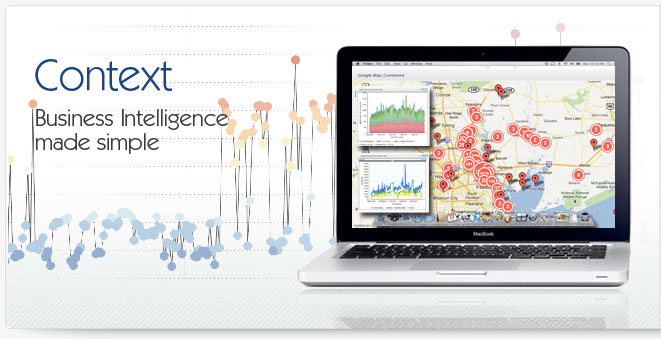
EMANIO Context! Business Intelligence software brings ease of use, flexibility and the best data manipulation workbench in the industry at an affordable price. From deployment to design and analysis, Context! provides an industry-leading ease of use that lessens the burden on IT staff while giving users the ability to create and share powerful data visualizations.

Context! provides increasing levels of sophistication, hiding the complexities of SQL queries from business users while giving analysts and power users the advanced tools they need to create truly insightful charts and reports.

With the features businesses need and a price that's unrivaled, any organization can finally deliver on the promise of Business Intelligence affordably and quickly.

Deploy, Manage, Expand

It starts with an easy to deploy, scalable infrastructure. Installations can be accomplished in as little as an hour, while clustering and load balancing support, coupled with sophisticated user and group management, provide a platform that will grow with you well into the future.

Build, Design, Distribute

Context! lets organizations build intuitive, purposeful representations of the data scattered throughout the company, giving managers and users who build and consume charts the ability to get their job done quickly and easily; while sophisticated distribution methods send the data that is needed, when it's needed, where it's needed.

Explore, Analyze, Collaborate

Context! gives your organization powerful collaboration capabilities and the ability to export charts into usable formats that can be repurposed in business reports and presentations. Interactive features like drill-down and drill-through capabilities provide understanding at any level of detail quickly and easily while collaboration features allow employees to have ongoing discussions about data across timelines and national boundaries

Context! Demo
First Name:

Last Name:

Company:

Email:

Phone:


Type the Characters:


Understand, Predict, Profile

All Business Intelligence products are designed to help you understand the past and visualize trends; but what about the future? With built-in what-if analysis functions, Context! provides the power to truly understand the outcome of business decisions. Add our powerful Insight! predictive analysis add-on and gain true forecasting precisions through the ability to build predictive profiles and sophisticated data mining applications.

See Context in Action

DEPLOY

Deploy, Manage, Expand

Context! simplifies the process of deploying your Business Intelligence platform through an easy to use installer and a process that can take you from purchase to a functional system in under an hour, avoiding the often frustrating and costly deployment nightmares associated with competing systems.

  • A full installer sets up the whole environment for you in one step
  • No client installs, simply use a standard browser
  • Access up to 26 different data types - and more through ODBC
  • Create customized, easy to recognize views for your users quickly and easily
  • Enterprise architecture with support for load balancing and clustering
  • Deploy to your users in days and get them working in under a month

Install in minutes, hours, days instead of weeks, months, years

It all starts with an easy to deploy, easy to set up platform. Don't have an enterprise Java server in house? No problem, our installation will set up a completely operational environment in just minutes. Want to use existing resources? That's OK too; Context will run on just about any Enterprise Java server out there. Getting the system into your users hands is even simpler: no local applications to install, no security plagued plug-ins to manage. Context relies on HTML and AJAX to deliver a powerful Web 2.0-based user experience via simple browser.

Load, design & publish

Getting data into the system is a simple point and click operation. Simply identify the data source, load the JDBC driver from the drop-down menu, point to the data source and you are done. Giving users powerful data without exposing them to the raw elements is even easier. An easy to use view builder lets IT staff or expert users create data views that are defined in plain English and categorize information in clear, custom folder structures; all while giving your sophisticated users even more control and power. Need to create reports based on multiple data sources? Once again Context! comes through; simply create a 'federated' view that ties data from multiple data sources into a single view - all without ETL tools or complicated development efforts, saving you time and money.

Expand, control, secure

Supporting additional users and adding power to Context! is also simple and intuitive. Simply migrate to faster hardware or take advantage of built-in clustering and load balancing capabilities. Controlling access to data is equally flexible. Built in role-based security lets the administrators give users the access they need, all with maximum security required, regardless of level of the organization. Group based management allows distribution of charts and dashboards dynamically with just a single click.

Context Video Demos

See what Context! can do for:

Intuitive means little if any training

The bane of all Business Intelligence deployments is the countless hours of expensive training required to gain a true understanding of the system's features. With Context!, getting familiar with the administration features, chart design and deployment options can be accomplished in just a week of training - all done remotely so the business can avoid the expense and disruption that comes with an invasion by an army of on-site consultants and trainers.

Don't wait to get started, try Context! today

Want to see how powerful EMANIO Context! is? Just download a copy and see for yourself how quickly you can get up to speed, how quickly you can become knowledgeable and how quickly Context! will change the way your company looks at data.

See Context in Action

Build, Design, Distribute

Ease of use is the cornerstone of Context! With a full drag-and-drop interface it allows users to create sophisticated data visualizations in minutes. A controlled "view" allows IT professionals or advanced users to create representations of data that are easy to use, easy to understand and can combine data from multiple data sources, making report building quicker and easier for all users.

  • Select data from an easy to use, drag-and-drop chart builder
  • Add advanced statistical analysis with one click
  • Add drill-down, drill-through and other dynamic controls easily
  • Publish charts to dashboards in seconds
  • Publish dashboards to users and groups in one step

Create in minutes

It all begins with an easy to use AJAX based drag-and-drop environment. Users access customized views of the data that IT, or advanced users have created for the organization or their department. Report and chart builders are presented with easy to understand, intuitive views of data in a custom folder hierarchy with easy to understand, custom field names. The whole process makes selecting data elements chart features quick and mistake proof.

Advanced statistical analysis

Even the best of data doesn't provide all the information your users need. Powerful, yet easy to use, calculation functions let your users work with existing fields to build complex calculated new ones on the fly. This ease of use combines with a series of over 25 available statistical, analytical and text functions to create in minutes complex graphical representations that in the past would have taken hours of dedicated work by business analysts, statisticians and IT staff.

Advanced visualizations

An intuitive interface makes building a chart or report just as simple. One of over 30 available chart types, along with individual formatting elements and colors let users quickly create and publish the chart needed in just a couple of minutes.

Context Video Demos

See what Context! can do for:

Deploy, distribute and share with ease

Charts alone don't tell the whole story, not at least unless that story can be shared. Context! provides powerful and easy to use dashboard building features that allow users to create complex data presentations using charts from any combination of available sources - letting employees create mixed reports and dashboards that tie sales, marketing, finance and any other type of data quickly and easily.

Sharing reports and dashboards is just as fast. Simply add the dashboard to a list of groups and the entire dashboard is automatically added to that group or user, without any work necessary from the recipient.

Don't wait to get started, try Context! today

Want to see how powerful EMANIO Context! is? Just download a copy and see for yourself how quickly you can get up to speed, how quickly you can become knowledgeable and how quickly Context! will change the way your company looks at data.

See Context in Action

EXPLORE

Explore, Analyze, Collaborate

Context! provides a powerful means of using charts and reports that have been created. From export formats that provide charts for use in reports, presentations and other communications, to subscription alerts and chart interactivity features, Context! makes it easy for business people to truly understand the drivers behind the business in minutes.

  • Geospatial sliders let you narrow a report to specific dates instantly
  • Drill-down and drill-through to better understand data in detail
  • Subscription and broadcast features to share data when needed
  • Advanced formatting highlights data dynamically based on pre-set rules
  • Collaborate with other users within Context!

Control your view

Context! provides automated controls to give viewers the detail they need from their data. A geospatial slider narrows the date range of historical reports to show how data changes at the specific interval selected. Switching from table view to chart view is as easy as clicking on a single icon, while features like 'favorites' let users track the charts that are of most importance via a single click of the mouse.

Get the detail you need

Context! can quickly and easily drill down to additional levels of detail for charts: From regions to territories to states, all seamlessly. Analytical tabs allow users to control how data is presented to them via check boxes and drop-down menus, giving them the ability to focus in on specific issues - like how many bicycles were sold in California vs. Colorado; while drill-through features let them connect data from one chart to another in one click, analyzing mountain bike sales for the US by simply clicking on a bar graph for national sales.

Stay on top of your data - automatically

Staying on top of changing data often means getting the needed information when its most critical. With chart subscriptions, users can set alerts that automatically trigger charts and reports on a schedule or based on specific conditions set by the user. Broadcast reports allow chart creators to send data out to groups or individuals using the same advanced techniques. Conditional formatting identifies key data based on pre-set rules, giving instant notice of key information when it's important to have it.

Context Video Demos

See what Context! can do for:

Collaborate and use your data

Advanced collaboration features allow employees to have complete dialogues with users who may not even be in the same geography or time zone, all through an easy to use set of collaboration features. Export controls allow users to take advantage of pre-built charts in reports and presentations while also giving them the ability to export data into Excel for personal analysis at any level desired.

Don't wait to get started, try Context! today

Want to see how powerful EMANIO Context! is? Just download a copy and see for yourself how quickly you can get up to speed, how quickly you can become knowledgeable and how quickly Context! will change the way your company looks at data.

See Context in Action

UNDERSTAND

Explore, Analyze, Collaborate

Context! provides a powerful means of using charts and reports that have been created. From export formats that provide charts for use in reports, presentations and other communications, to subscription alerts and chart interactivity features, Context! makes it easy for business people to truly understand the drivers behind the business in minutes.

  • Geospatial sliders let you narrow a report to specific dates instantly
  • Drill-down and drill-through to better understand data in detail
  • Subscription and broadcast features to share data when needed
  • Advanced formatting highlights data dynamically based on pre-set rules
  • Collaborate with other users within Context!

Control your view

Context! provides automated controls to give viewers the detail they need from their data. A geospatial slider narrows the date range of historical reports to show how data changes at the specific interval selected. Switching from table view to chart view is as easy as clicking on a single icon, while features like 'favorites' let users track the charts that are of most importance via a single click of the mouse.

Get the detail you need

Context! can quickly and easily drill down to additional levels of detail for charts: From regions to territories to states, all seamlessly. Analytical tabs allow users to control how data is presented to them via check boxes and drop-down menus, giving them the ability to focus in on specific issues - like how many bicycles were sold in California vs. Colorado; while drill-through features let them connect data from one chart to another in one click, analyzing mountain bike sales for the US by simply clicking on a bar graph for national sales.

Stay on top of your data - automatically

Staying on top of changing data often means getting the needed information when its most critical. With chart subscriptions, users can set alerts that automatically trigger charts and reports on a schedule or based on specific conditions set by the user. Broadcast reports allow chart creators to send data out to groups or individuals using the same advanced techniques. Conditional formatting identifies key data based on pre-set rules, giving instant notice of key information when it's important to have it.

Context Video Demos

See what Context! can do for:

Collaborate and use your data

Advanced collaboration features allow employees to have complete dialogues with users who may not even be in the same geography or time zone, all through an easy to use set of collaboration features. Export controls allow users to take advantage of pre-built charts in reports and presentations while also giving them the ability to export data into Excel for personal analysis at any level desired.

Don't wait to get started, try Context! today

Want to see how powerful EMANIO Context! is? Just download a copy and see for yourself how quickly you can get up to speed, how quickly you can become knowledgeable and how quickly Context! will change the way your company looks at data.

See Context in Action